Put your time in
where it belongs.
Other time trackers want an account, a monthly fee and your attention. Chukka just wants you to press start.
For Mac · macOS 14 Sonoma or later · Pay once, no subscription

That's the whole app
Everything you need.
Nothing you'll never use.
No dashboards to set up, no tags to manage, no team settings to dig through. Clients, projects and a start button.
One click. Or the space bar.
Press start when you sit down, stop when you get up. Each stretch becomes a session. Tap Space and you're on the clock.
Money first
Set each client's hourly rate once. Chukka shows what every project has earned, live, while the clock runs.
It notices when you're away
Stepped out and forgot to stop? Chukka asks what to do with the time when you're back, so your hours stay honest.

Compact mode
Stays out of your way.
Shrink Chukka to a tiny floating timer and tuck it in a corner. It stays on top while you work, follows you across desktops, and one click starts or stops the clock without pulling you out of what you're doing.

Unbilled time
Know what you're owed.
See what you've earned and what's still unbilled, for this week, this month or any dates you like. Mark it invoiced and it turns into a green check.
Client summaries
Bill in one click.
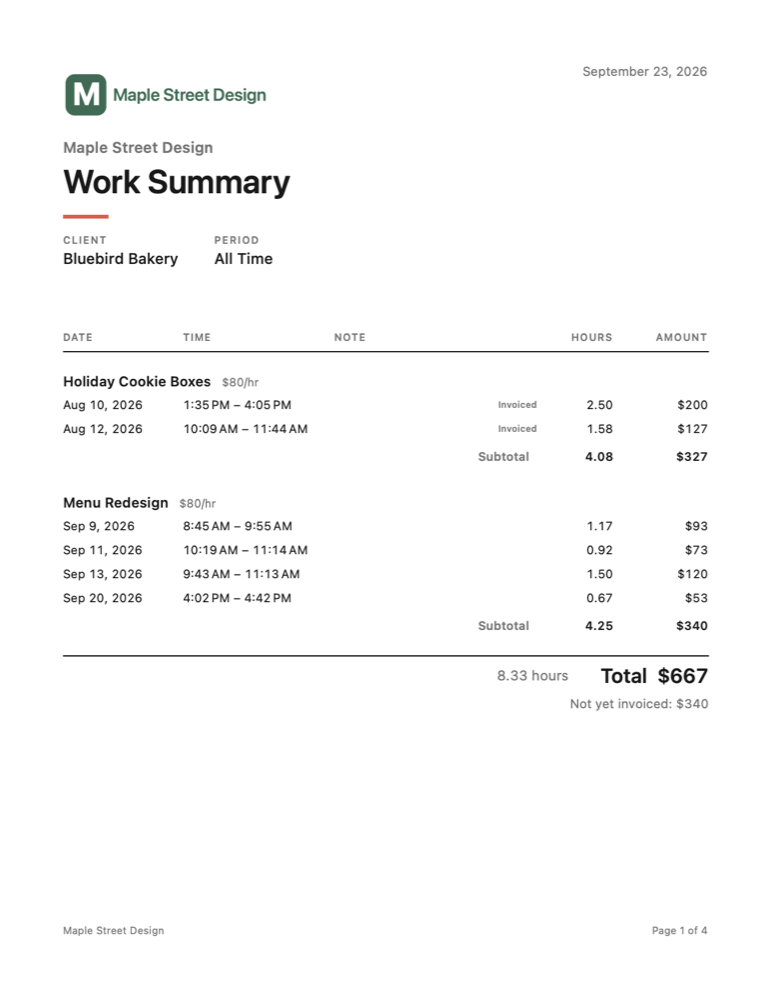
Turn a month of work into a clean PDF summary with your logo, every session and a total, ready to attach to your invoice. Prefer spreadsheets? Export to CSV.
Round each session up to 6, 15 or 30 minutes if that's how you bill, and set a custom rate or a fixed price for any project.
Bring your history with you
Export your time entries as a CSV file from your current tracker, then import them into Chukka. Clients and projects are matched up for you, and duplicates are skipped.
- Toggl Track
- Clockify
- Harvest
- Spreadsheets
Switching
Switch in seconds.
Leaving a subscription tracker? You don't have to start from zero, or retype a thing.

Meet Chukka
He checks in. Then he gets out of your way.
Chukka the woodchuck keeps the clock for you. He only speaks up when it's useful.
Yours alone
Your time is your business.
Everything lives in one file on your Mac, backed up every day. Chukka doesn't collect anything, track anything or phone home. Read the privacy policy, it's short.
Why Chukka
Why not one of the big names?
The popular time trackers are built for teams and dashboards. If you just want to track your hours and get paid, they're a lot of app.
| Chukka | Typical time trackers | |
|---|---|---|
| Getting started | Add a client, press play | Sign up, create a workspace, invite a team |
| Account | None | Required |
| Price | Pay once | Monthly subscription for the good parts |
| Your data | Stays on your Mac | Stored on their servers |
| While you work | A tiny floating timer | A browser tab or a big window |
| Features | The ones you'll use | Tags, teams, reports, integrations… |
Questions
How much does Chukka cost?
Chukka is a one-time purchase on the Mac App Store. No subscription, ever. Pricing will be announced at launch.
Which Macs does it run on?
Any Mac running macOS 14 Sonoma or later, on Apple silicon or Intel.
Is there an iPhone app or sync?
Not today. Chukka keeps everything on your Mac, which is also why it needs no account. If lots of people ask for an iPhone version, we'll look at it.
What happens to my data?
It stays in a single file on your Mac, with a daily backup kept for 30 days. You can export everything to CSV at any time. Nothing is sent anywhere.
Can I bring my hours over from another app?
Yes. Chukka imports CSV exports from Toggl Track, Clockify and Harvest, and most spreadsheets with columns like Client, Project, Date and Duration.
What does “Chukka” mean?
A chukka is a period of play in polo, about seven and a half minutes. A match is made of chukkas the way a project is made of sessions. The word comes from the Hindi chakkar, “circle” or “wheel”, like a clock face. That's the ring in the icon. And yes, the woodchuck is named Chukka too.